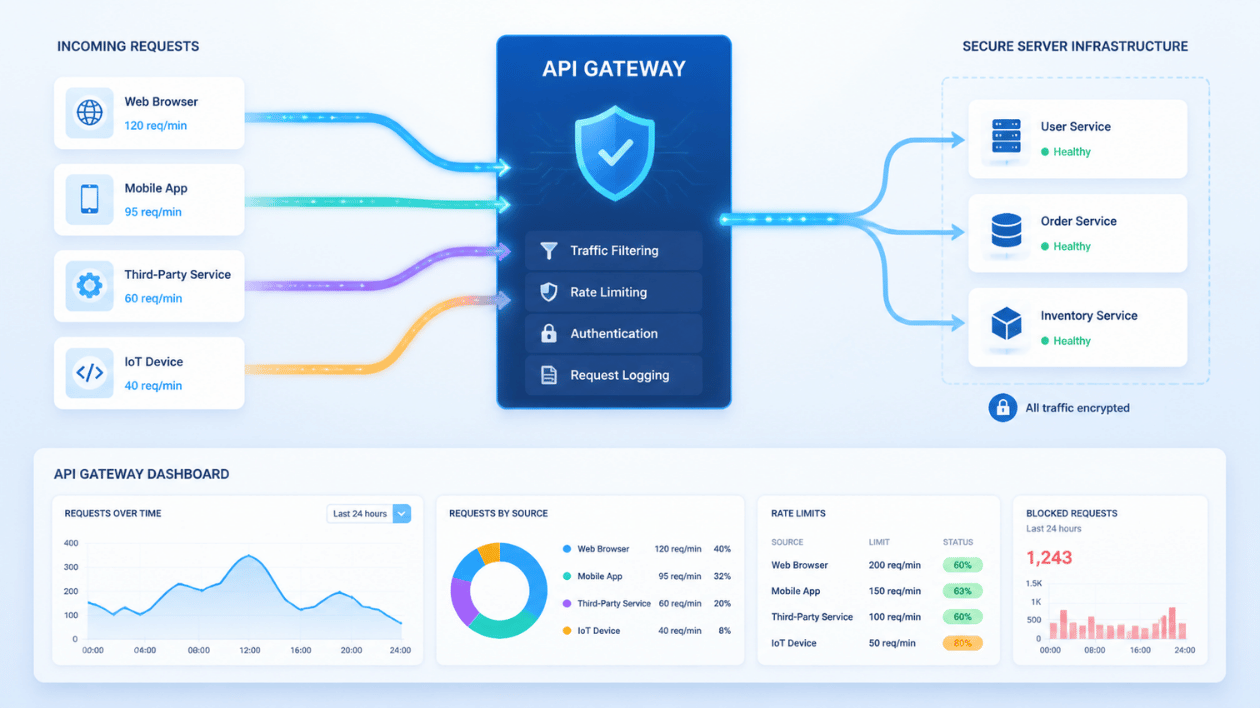


Websites and applications receive requests every second. Customers browse products, submit forms, check account details, and make payments. Behind these activities, APIs handle communication between different software systems.
However, problems arise when an API receives too many requests within a short period. Servers may become overloaded, response times may increase, and legitimate users may struggle to access services.
This is where API Rate Limiting becomes important. It controls how frequently users or applications can send requests to an API. This helps websites maintain performance, protect server resources, and provide reliable services during traffic spikes.
What Is API Rate Limiting?
API Rate Limiting is a technique that restricts the number of requests a user, application, or IP address can make within a defined period.
For example, an API might allow 100 requests per minute from a particular user. Once that limit is reached, additional requests may be temporarily rejected until the next time window begins.
This prevents individual users or automated systems from consuming excessive server resources.
Developers can configure limits based on different requirements, such as:
-
Requests per second
-
Requests per minute
-
Daily API request limits
-
Requests from individual IP addresses
-
Requests based on user accounts or API keys
The purpose is not to restrict genuine customers unnecessarily. It is to distribute available resources fairly and keep applications responsive.
Why Do Websites Need API Rate Limiting?
Without request restrictions, an application can struggle to handle sudden traffic increases. A large number of requests may affect databases, application servers, and connected services.
Consider an ecommerce website during a seasonal sale. Thousands of customers may check product availability, update shopping carts, and complete payments simultaneously.
If the backend cannot manage these requests, customers may experience failed transactions or slow page loading.
API Rate Limiting helps businesses address several problems.
1. Prevents Server Overload
Every API request consumes server resources. Processing large numbers of requests requires additional CPU, memory, database connections, and network capacity.
Rate limits control how many requests reach an application within a specific period. This helps maintain stable server performance during busy periods.
2. Reduces Automated Abuse
Some automated scripts repeatedly send requests to websites. These activities may include credential attacks, scraping, and attempts to discover system vulnerabilities.
Rate limiting makes repeated requests harder to execute at scale. It also gives security teams better control over suspicious traffic patterns.
3. Protects Database Performance
APIs frequently communicate with databases to retrieve or update information. Excessive requests can create unnecessary database queries.
For example, a travel booking application may repeatedly check flight availability. Request restrictions help prevent excessive queries from affecting other customers.
4. Improves User Experience
Customers expect websites to respond quickly. Slow searches, failed logins, and interrupted payments can damage their experience.
By controlling request volumes, businesses can protect essential application functions and maintain more predictable response times.
How API Rate Limiting Works
API Rate Limiting follows a straightforward process. It checks incoming requests against predefined rules before allowing them to access the requested resource.
A typical process includes:
-
A user sends a request to an API endpoint.
-
The API gateway or server identifies the user, API key, or IP address.
-
The system checks how many requests have already been received.
-
It compares the request count against the configured limit.
-
If the request stays within the limit, the API processes it.
-
If the limit is exceeded, the system rejects or delays the request.
When a client exceeds its permitted limit, the API commonly returns HTTP status code 429 Too Many Requests.
The response may also include a Retry-After header. This tells the client when it can attempt another request.
Developers should also configure appropriate error messages. This helps applications handle rejected requests without confusing users.
Common API Rate Limiting Algorithms
Different applications require different request-control methods. Developers choose algorithms based on traffic patterns, system requirements, and available infrastructure.
1. Fixed Window Counter
The fixed window counter tracks requests within a predefined time period.
For example, an API may allow 100 requests every minute. The counter resets when the next minute begins.
This approach is simple to implement and requires relatively little storage.
However, it can allow sudden traffic spikes around window boundaries. A user might send 100 requests just before a reset and another 100 immediately afterward.
2. Sliding Window
The sliding window algorithm tracks requests across a continuously moving time period.
Instead of resetting at fixed intervals, it considers requests made during the previous 60 seconds.
This creates more consistent traffic control and reduces sudden request bursts around time-window boundaries.
It can require more processing and storage than a basic fixed counter.
3. Token Bucket
The token bucket algorithm provides flexibility when applications experience changing traffic volumes.
A system maintains a bucket containing tokens. Each incoming request consumes one token. Tokens are replenished at a configured rate.
If tokens are available, the request proceeds. Otherwise, the system rejects or delays it.
This method allows short bursts of traffic while maintaining an average request rate.
4. Leaky Bucket
The leaky bucket algorithm processes incoming requests at a controlled rate.
Requests enter a queue and leave at a consistent speed. If the queue becomes full, additional requests may be rejected.
This approach helps applications maintain predictable processing rates during sudden traffic increases.
Where Businesses Use API Rate Limiting
API Rate Limiting supports several industries where applications process frequent requests.
Ecommerce Platforms
Online stores use APIs for product searches, customer accounts, payments, and inventory updates.
Rate limiting helps prevent excessive requests from affecting product pages and checkout operations.
Banking and Financial Applications
Financial platforms process account enquiries, transaction requests, and payment confirmations.
Request limits help control repeated login attempts and protect sensitive endpoints from automated abuse.
Healthcare Applications
Healthcare platforms exchange appointment details, patient information, and billing records through APIs.
Rate limiting helps manage request volumes and protect application availability.
Travel and Booking Platforms
Travel applications frequently request flight schedules, hotel availability, and booking information.
API Rate Limiting helps control repeated searches and reduces unnecessary requests to external service providers.
Best Practices for Implementing API Rate Limiting
A poorly configured limit can affect genuine customers. Businesses should consider application requirements before setting request restrictions.
Set Limits Based on Actual Usage
Different API endpoints have different resource requirements.
A simple product search may consume fewer resources than a payment processing request. Therefore, developers should configure limits according to endpoint complexity.
Apply Different Limits to Different Users
A free account may need different request allowances from a paid business account.
User-based limits help businesses distribute resources according to account permissions and service agreements.
Monitor API Traffic Regularly
Developers should monitor request volumes, response times, error rates, and unusual traffic patterns.
These details help identify endpoints that need additional protection or performance improvements.
Provide Clear Error Responses
When users exceed request limits, applications should return understandable error messages.
A 429 response with retry information helps developers and applications handle temporary restrictions correctly.
Combine Rate Limiting with Other Security Measures
Rate limiting is not a complete security solution. Businesses should also use authentication, access controls, input validation, and monitoring.
Developers can also review common coding mistakes to identify implementation problems that may affect application reliability.
Tools Used for API Rate Limiting and Testing
Developers use different tools to configure, monitor, and test API request limits.
-
Kong Gateway: Supports API traffic management through configurable plugins.
-
NGINX: Provides request-limiting features at the server level.
-
Amazon API Gateway: Offers configurable throttling for API endpoints.
-
Cloudflare: Provides traffic management and security features.
-
Redis: Supports fast request counters and distributed rate-limiting implementations.
-
Postman: Helps developers test API responses and verify request behaviour.
Tools such as Postman and other free web developer tools can help teams test endpoints before deployment.
The right choice depends on application architecture, infrastructure, traffic volume, and security requirements.
Common API Rate Limiting Mistakes to Avoid
Even a properly configured rate-limiting system can create problems when developers overlook important details.
Some common mistakes include:
-
Setting extremely low request limits for genuine users.
-
Applying identical limits to every API endpoint.
-
Ignoring distributed applications and shared user accounts.
-
Failing to monitor rejected requests.
-
Providing unclear 429 error responses.
-
Treating rate limiting as a replacement for authentication.
-
Not testing traffic spikes before deployment.
Businesses should review their limits regularly as application usage grows.
Conclusion
API Rate Limiting helps websites control incoming requests and protect application resources. It reduces the risk of server overload, limits automated abuse, and supports consistent application performance.
Businesses should select suitable algorithms, monitor API traffic, and configure limits according to actual usage.
A well-implemented approach allows applications to handle growing traffic without unnecessarily restricting legitimate users.
Frequently Asked Questions
1. What is API Rate Limiting?
API Rate Limiting controls how many requests a user or application can send within a specific period. It helps prevent excessive traffic and protects server resources.
2. What happens when an API request limit is exceeded?
The API may reject additional requests and return HTTP status code 429 Too Many Requests. Some systems also provide information about when users can retry.
3. Does API Rate Limiting improve website performance?
Yes. It helps control excessive requests, reduce unnecessary processing, and protect application resources. This can support more consistent website performance.
4. Which algorithms are commonly used for API Rate Limiting?
Common algorithms include Fixed Window Counter, Sliding Window, Token Bucket, and Leaky Bucket. Each approach handles incoming requests differently.
5. Is API Rate Limiting necessary for small businesses?
Yes. Small businesses also need protection against excessive API requests. Rate limiting helps control resource consumption and maintain application availability as traffic grows.