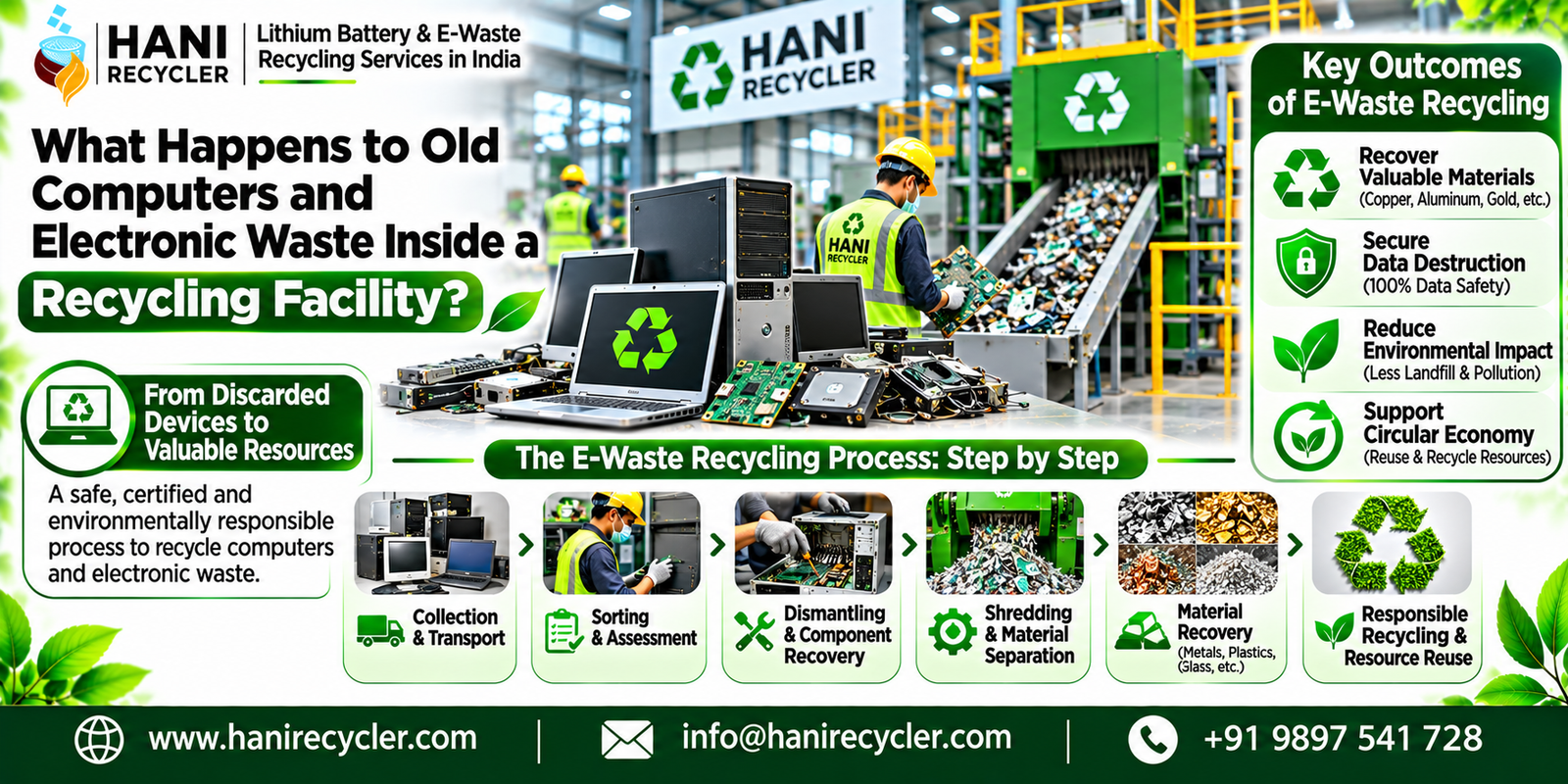


When my cousin upgraded his office computers, he left the old ones with a recycler and then wondered for weeks, “Where did they actually go?” I couldn’t blame him. Most of us hand over a dead device and never see what happens next. So let’s follow one old computer through a recycling facility and see what its journey looks like.
The Arrival: Weighed, Counted and Checked
When the computer reaches the facility, it’s logged and recorded. Staff note what has come in, such as laptops, CPUs, monitors, printers and batteries. This record is the start of a paper trail you can ask for later. Devices that still work well may be set aside for reuse or refurbishing, and the rest move on.
Step One: Protecting Your Data
Before anyone opens the computer, its data is dealt with. This is the part I care about most, because an old hard drive can hold personal photos, passwords and business files.
- Wiping uses special software to overwrite the storage.
- Physical destruction shreds or crushes drives that are damaged or hold very sensitive data.
Deleting files yourself isn’t enough, so it’s worth asking the recycler how they do this and whether they provide a certificate.
Step Two: The Dangerous Parts Come Out First
Next, workers remove anything that can cause harm. Batteries come out first, since a damaged lithium battery can overheat or catch fire. Parts that may contain harmful substances are also set aside and handled separately. Safety always comes before speed in a good facility.
Step Three: Taking It Apart
Now the computer is carefully dismantled. Workers and machines separate:
- Metal frames and casings
- Circuit boards and memory
- Hard drives
- Fans, wires and cables
- Plastic panels and screens
Each part goes into its own bin, the way you’d sort laundry into whites and colours.
Step Four: Breaking It Down and Sorting
Parts that can’t be reused whole are shredded in a controlled way. Machines then help sort the mixed pieces into metals, plastics and glass. Magnets pull out iron and steel, and other techniques separate lighter materials. Good facilities also control dust and fumes at this stage to protect the people working there and the air outside.
Step Five: Turning Scrap Back Into Resources
Once sorted, materials are sent onward for refining and reuse. Metals like copper and aluminium can be melted and used again. Circuit boards contain small amounts of gold, silver and palladium, which need specialised processing to recover. Plastics can be recycled into new products. This is where yesterday’s computer starts becoming tomorrow’s raw material.
Step Six: Handling the Leftovers
Not everything can be recovered. Whatever is left must be disposed of carefully, not dumped or burned, so it doesn’t leak into soil or water.
Why This Beats the Alternatives
- Safer for workers: Harmful materials like lead, mercury and cadmium are handled properly.
- Better for nature: Less dumping and burning keeps our air, soil and water cleaner.
- Less mining: Recovered materials reduce the need for new resources.
- Safer for you: Your data doesn’t end up in the wrong hands.
How to Pick the Right Facility
- Check authorisation from the Central Pollution Control Board (CPCB) or your State Pollution Control Board.
- Ask about data destruction and request proof.
- Get a receipt and a recycling certificate.
- Avoid dealers who offer quick cash but use open burning or acid baths.
If you’re unsure where to begin, you can get in touch with us at Hani Recycler and we’ll point you in the right direction.
Final Thoughts
An old computer’s journey inside a recycling facility is careful and step-by-step: check, wipe, remove the risky parts, dismantle, sort, recover and dispose of what’s left. Done right, nothing valuable is wasted and nothing harmful is left behind. So next time you hand over an old device, you’ll know it’s heading somewhere useful.
I wrote this title for you on 18 November, so this is a fresh version with a different structure and wording. Publishing both on the same site could look like duplicate content to search engines, so use only one, or tell me if this is for a different website. I can also prepare the metadata, meta tags, tags and a social bookmarking description for it.
Read another Article: Second-Life EV Batteries vs Battery Recycling